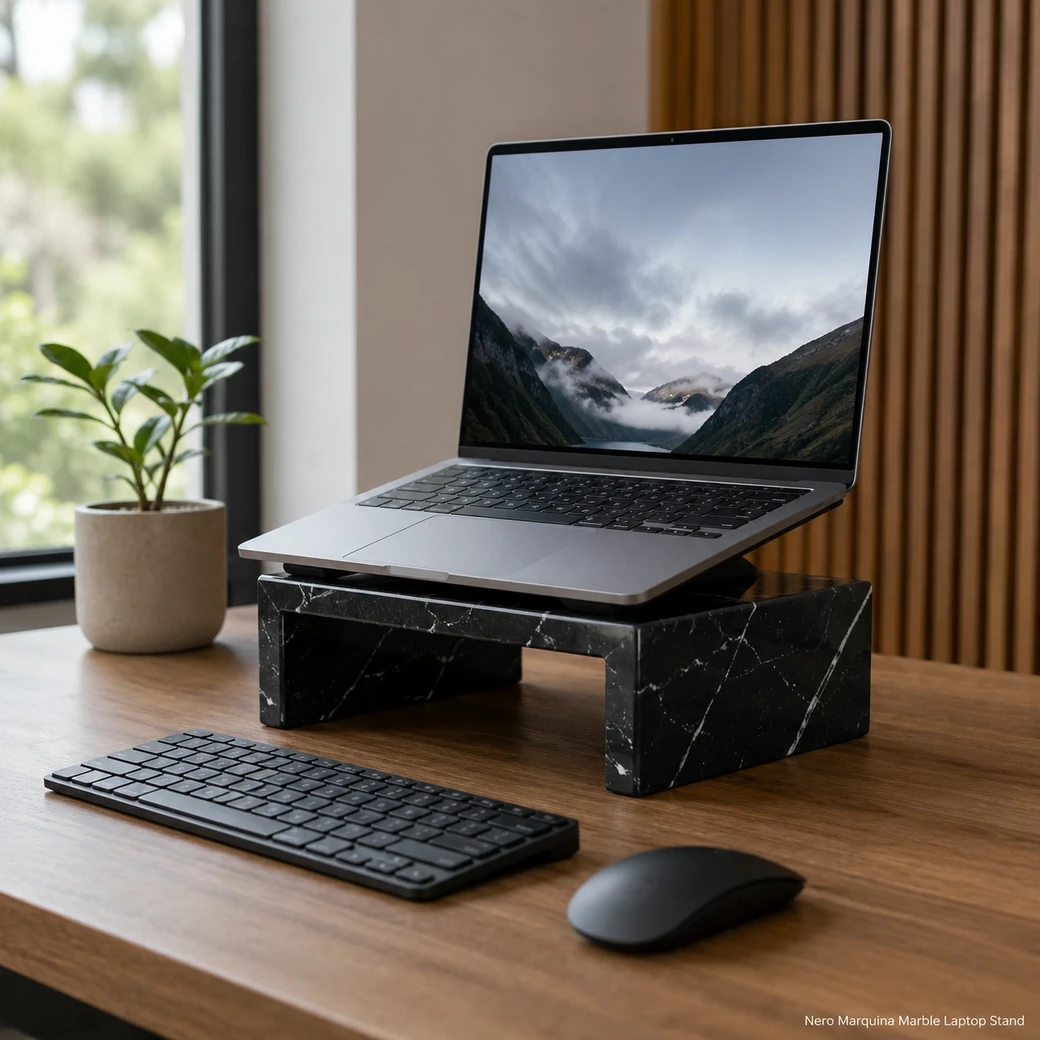
A laptop stand for desk use should raise the screen toward eye level so the user can maintain a more neutral head and neck position; intensive laptop work is better with an external keyboard and mouse. A stable weighted base can support common laptops when correctly sized, while ventilation gaps help airflow. For a laptop stand for bed, prioritize stability and safe placement rather than excessive height.
Ergonomic Stone Laptop Elevation
Marble Laptop Stand Small
Secure product inquiry
Buy now
Cash on delivery available. Product details are pre-filled below. Owner delivery adds AED 5,000.
Device Fit & Ventilation
Screen Height, Device Protection and Airflow
A useful laptop riser should raise the screen without trapping heat beneath the computer. Comparable stands combine an elevated viewing position with ventilation clearance, felt or silicone contact points and slots sized for common laptops and MacBooks. The 6.20 kg weight of this Nero Marquina design provides substantial stability, but the support area and device slot still need enough clearance to avoid pressing against the laptop body or blocking charging and ventilation ports.
Ergonomic Fit
Choosing the Right Stone Laptop Riser
Choose an elevated stone laptop riser when the screen needs to move closer to a neutral viewing height while the computer remains open; for prolonged work, pair it with an external keyboard and mouse so the raised keyboard does not compromise arm position. A vertical dock is preferable when the laptop is closed and the main goal is saving desk space rather than improving screen height.
Device Layout
Nero Marquina Computer Stand Formats
Elevated risers support active laptop use and screen-height adjustment, while single or dual vertical docks store closed devices and recover desk space. Lap-desk formats need a lighter engineered structure because solid stone becomes cumbersome away from a fixed surface. Genuine Nero Marquina provides real mineral variation and weight; faux-marble versions only reproduce its visual pattern.
MacBook Desk Stand Dimensions and Fit
The 30 × 25 cm platform should fully support the laptop footprint while the 12 cm rise improves screen position without blocking ventilation or device clearance.
Ventilated Notebook Riser Airflow
Keep the underside open around laptop intake and exhaust zones, with ventilation gaps and cable routing positioned so the 30 × 25 cm stone platform does not trap device heat.
Black Limestone Laptop Support Contact Points
Felt or silicone pads should separate the laptop from the Brosso Vecchio stone at every support point, preventing scratches during repeated placement and removal.
Product Data
Executive Laptop Pedestal Product Details
This small Executive Laptop Pedestal is made from Nero Marquina Black Limestone with an Inky Black surface and contrasting White Veining under a Brosso Vecchio Finish. Measuring 30 cm × 25 cm × 12 cm and weighing 6.20 kg, its substantial low-profile construction provides a stable raised platform for desktop laptop use.
| Device Contact Pad Material | 2 mm silicone rubber pads, Shore A 50–60 |
|---|---|
| Platform Tilt Angle | 12° fixed platform incline |
| Front Retaining Lip Height | 15 mm-high front retaining lip with R3 mm rounded upper edge |
| Cable Pass-Through Width | 20 mm-wide rear cable pass-through with polished R3 mm edges |
| Laptop Footprint Range | Supports laptop footprints from approximately 280 × 200 mm to 360 × 250 mm |
| Anti-Slip Base Pad | 2 mm-thick microsuction silicone base pad covering at least 70% of the underside |
| Wrist Clearance | Minimum 90 mm clear wrist space ahead of the laptop-retaining lip |
| Desk Contact Area | Minimum 240 × 180 mm silicone-lined contact area on the desk surface |
| Device Stop Depth | 12 mm usable retaining depth behind the front device stop |
| Edge Radius | R5 mm radius on all exposed device-contact and desk-contact edges |
Made to Order
Custom MacBook Riser Options
A custom MacBook riser can be adjusted to the exact device footprint, required screen height and preferred keyboard position rather than relying on a universal size. Specify ventilation cutouts, charging-cable slots and an appropriate front stop, then select a stone thickness and overall riser size that support the laptop without obstructing its cooling openings.
Key Benefits
Why Choose This Desktop Computer Platform
A marble desktop computer platform can raise a laptop screen toward a more comfortable viewing height while its substantial Nero Marquina mass keeps the support steady during typing or docking. Bespoke fabrication allows the platform width, ventilation openings and support geometry to be matched to the specific device rather than relying on a universal fit, making it better suited to permanent desk setups.
- Improved Screen Height
Raising the laptop screen closer to eye level can reduce downward viewing while the weighted Nero Marquina base keeps the device securely positioned.
- 6.20 kg Stability
The 6.20 kg Nero Marquina build keeps the laptop platform firmly positioned while the computer is used, adjusted or removed.
- Open Airflow Clearance
Open clearance beneath and around the laptop supports ventilation while raising the screen without blocking normal cooling airflow.
- Custom Device Sizing
Platform width, depth and ventilation clearance can be customized around the exact laptop footprint so the device remains fully supported without blocking airflow.
Purchase Guidance
Before Ordering a Stone Notebook Stand
Before ordering a Nero Marquina notebook stand, provide the laptop width, depth and weight so the platform comfortably supports the actual device rather than a generic screen size. State the desired viewing height, whether an external keyboard and mouse will be used, and the ventilation clearance required around the laptop; specialist stone sourcing from travertine tile suppliers likewise depends on application-specific dimensions and performance needs.

Specification Reference
Nero Marquina Laptop Riser Technical Specifications
The specification table should confirm the 30 × 25 × 12 cm dimensions and 6.2 kg weight together with the usable laptop platform, ventilation openings, felt or silicone protection and compatible device footprint so you can check that your laptop sits securely while maintaining the intended viewing height and airflow.
Product details
Specifications, care, delivery and FAQ
Everything is rendered from product JSON fields so the page remains SEO-ready even before JavaScript runs.
Cleaning: Remove and unplug the laptop, dust the Brosso Vecchio Nero Marquina platform and ventilation gaps with a microfiber cloth, wipe with a barely damp neutral-cleaner cloth and dry immediately, clean silicone or felt pads separately, avoid liquid near electronics acids abrasives and oily polish
Daily Care: Remove dust from the ventilation gaps and Brosso Vecchio surface daily, wipe with a dry or barely damp microfiber cloth, keep silicone or felt contacts clean, prevent liquids from reaching electronics, avoid acidic cleaners abrasives and dragging the laptop
- Avoid using the raised stand for intensive work without an external keyboard and mouse
- avoid blocking laptop vents
- avoid direct device contact with hard stone
- avoid liquid near electronics
- avoid acidic or abrasive cleaners
Maintenance: Dust ventilation gaps and the Brosso Vecchio platform regularly, wipe using a dry or barely damp microfiber cloth, clean or replace silicone and felt contact pads, keep liquids away from electronics, confirm the laptop vents remain open, pair with an external keyboard and mouse for prolonged ergonomic use
Handling: Remove and unplug the laptop before moving the 6.2 kg stand, lift the Nero Marquina base with both hands, lower the device onto non-staining pads, keep ventilation gaps open, position it on a stable desk, never drag the laptop across stone or carry the stand with the device installed
How high should a laptop riser lift the screen so the top of the display sits near eye level without forcing an uncomfortable keyboard position?
Raise the laptop until the top of the screen is at or slightly below eye level, which commonly requires about 10–20 cm of lift depending on the user and furniture. Because this position makes the built-in keyboard too high for prolonged typing, use a separate keyboard and mouse or select a smaller lift that preserves neutral wrists for short sessions.
What size and placement of ventilation openings are needed beneath the laptop so the stone platform does not obstruct its intake vents or trap operating heat?
Ventilation openings should align with the laptop’s underside intake zones rather than follow a generic decorative pattern. Use broad open slots or a raised support system that leaves most of the underside exposed, keeps rubber feet supported and allows air to enter from multiple directions without weakening the stone around narrow bridges or edges.
What usable platform dimensions are needed to support 13-inch, 15-inch and 16-inch laptops without covering their ventilation openings or allowing the rubber feet to overhang?
A platform around 30 × 25 cm suits many 13-inch laptops and compact 15-inch models, but some 16-inch devices may overhang slightly. Overhang is acceptable only if all rubber feet remain supported and intake vents stay open; measure the specific laptop’s footprint and foot positions before selection.
Which non-staining silicone or felt contact pads protect the laptop from scratches while preventing it from sliding on the angled Nero Marquina platform?
Use thin neutral-coloured, non-migrating silicone strips at the lower lip and main support points because they provide grip, resist heat and moisture and protect the laptop finish. Felt is softer but allows more sliding and traps dust; all pads should be replaceable, non-staining and positioned without covering the laptop’s ventilation openings.
When this 12 cm-high stand raises the laptop screen toward eye level, is an external keyboard and mouse necessary to prevent elevated shoulders and bent wrists during extended work?
An external keyboard and mouse are recommended whenever the raised laptop is used for extended typing. Raising the screen improves neck position but also elevates the built-in keyboard, which can bend wrists and lift shoulders; short viewing or occasional input is acceptable, but sustained work should separate screen height from keyboard height.
Reviews
Reviews and new review submission
0.0 average rating from 0 reviews. New reviews are saved as pending until approved.
No approved reviews yet for this product. The review form is ready for buyer submissions.