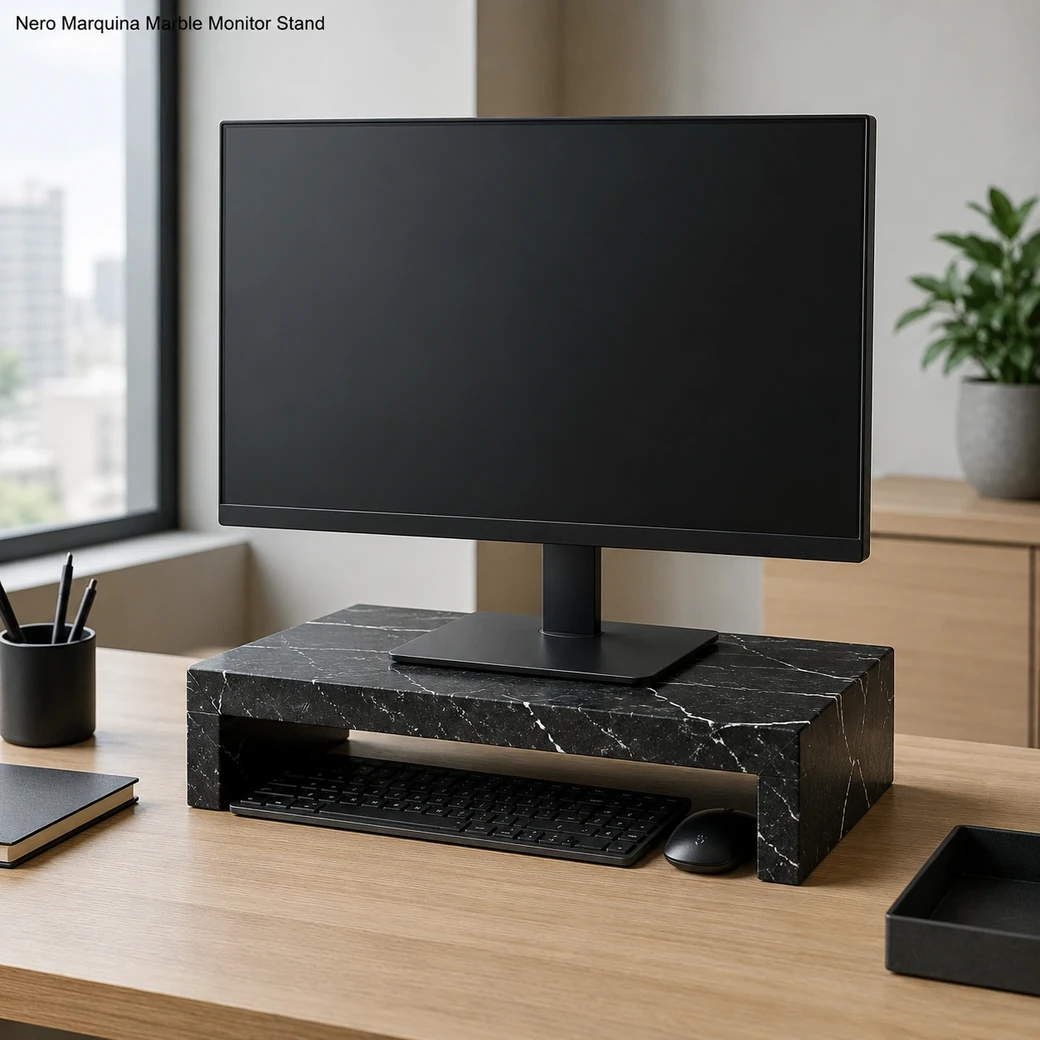
A monitor stand for desk use should raise the display only enough to put the top of the screen at or slightly below eye level; OSHA also recommends roughly 20–40 inches viewing distance. Load capacity must exceed the monitor weight, and wider risers can support dual screens if engineered accordingly. Open space underneath can store a keyboard or accessories, while the stone surface should be dusted with a soft cloth.
Ergonomic Desktop Screen Elevation
Marble Monitor Stand Small
Secure product inquiry
Buy now
Cash on delivery available. Product details are pre-filled below. Owner delivery adds AED 5,000.
Storage, Width & Multi-Screen Support
Choosing the Right Height and Screen Capacity
Monitor height should place the screen closer to eye level while leaving enough space beneath for a keyboard, files or accessories. Comparable risers range from compact single-screen platforms to adjustable multi-panel units roughly 28–42 inches wide, with load ratings varying from about 22 lb to 100 lb depending on construction. For this 38.1 cm-wide stand, the monitor footprint and weight should be checked before use rather than assuming compatibility from screen size alone.
Ergonomic Setup
Choosing the Right Stone Monitor Riser
Choose the riser height so the top of the monitor ends at or slightly below the user’s eye level in their normal seated posture. A stand that raises the display too far can create upward neck extension, so measure the existing screen position from the desk and add only the elevation actually required.
Workspace Formats
Nero Marquina Desktop Riser Configurations
A single-monitor riser needs only enough width for one screen base and useful keyboard storage beneath. Dual-screen formats require substantially more span and stronger support, while wide adjustable desk shelves add flexibility for changing equipment layouts but rely on an engineered frame rather than the stone alone to provide height adjustment.
Computer Stand Screen Footprint and Load
The monitor base should fit completely within the 38.1 × 26.2 cm platform, and the stand’s verified load rating must exceed the actual monitor weight.
Desk Shelf Keyboard Clearance
Use the open area beneath the 38.1 cm-wide riser for a keyboard, files or small accessories without blocking the user’s primary desk space.
PC Riser Cable Management
Keep rear access open for power and display cables, add channels where required and position optional phone or tablet slots without obstructing the monitor base.
Product Data
Graphite Black Monitor Pedestal Details
This small Graphite Black Monitor Pedestal uses Nero Marquina Spanish Limestone with Graphite Black coloring and contrasting White Veining beneath a Brosso Vecchio Finish. At 38.1 cm × 26.2 cm × 11.7 cm and 9.20 kg, its broad stone platform provides a substantial riser for compatible monitor bases.
| Keyboard Clearance Height | Approx. 9.5 cm usable keyboard clearance beneath riser |
|---|---|
| Cable Slot Width | 50 mm rear cable slot |
| Monitor Footprint Zone | 500 × 200 mm clear monitor-footprint zone centred on the top |
| Rear Cable Channel | 60 mm-wide × 15 mm-deep rear cable channel with two side exits |
| Device Slot Provision | 250 × 25 mm felt-lined front device slot for a phone or tablet |
| Base Anti-Slip Pads | Four 3 mm-thick non-marking silicone pads, each approximately 40 × 40 mm |
| Front Edge Radius | R8 mm continuous radius on the exposed front edge |
| Load Distribution Pad | 3 mm-thick high-density EVA load-distribution pad covering the monitor-footprint zone |
| Desk Contact Area | Minimum 500 × 200 mm padded desk-contact area |
| Monitor-Arm Clamp Clearance | Minimum 80 mm clear rear-edge depth for monitor-arm clamps opening to 70 mm |
Made to Order
Custom Dual Monitor Platform Options
A custom dual-monitor platform can be widened for two bases or a monitor arm while retaining verified support across the full span. Storage clearance, rear cable cutouts and device slots can be incorporated, with reinforcement specified according to the finished stone thickness and equipment load.
Key Benefits
Why Choose This Marble Desktop Riser
A marble desktop riser can raise a monitor toward a more comfortable eye level while using its natural mass to keep the support stable under the display. Open space beneath the platform can store a keyboard, dock or small accessories, helping reclaim desk area. Width and load capacity should be matched to the actual monitor setup, especially when supporting dual screens.
- Improved Screen Position
The riser raises the monitor toward a more suitable viewing height while maintaining a stable platform for daily desk use.
- 9.20 kg Stability
The 9.20 kg Nero Marquina riser stays firmly planted beneath the monitor while supporting a stable raised screen position.
- Under Desk Storage
Open space beneath the raised monitor can store a keyboard, notebook or desk accessories, reclaiming usable working surface.
- Custom Monitor Sizing
Width, depth and riser height can be tailored around single or dual-monitor footprints while preserving the required viewing position and support capacity.
Purchase Guidance
Before Ordering a Stone Computer Stand
Before ordering a Nero Marquina computer stand, measure the monitor base footprint and total equipment weight so the riser provides full support without unstable overhang. Specify the target viewing height and whether the open space beneath must accommodate a keyboard, dock or accessories; structural sizing is equally application-specific for exterior stone components such as pool coping.

Specification Reference
Nero Marquina Monitor Riser Technical Specifications
Check the technical table for the 38.1 × 26.2 cm platform, 11.7 cm height and 9.2 kg weight together with verified monitor load, usable under-stand clearance and any cable-management openings so you can determine whether your monitor footprint, accessories and desk layout fit the riser correctly.
Product details
Specifications, care, delivery and FAQ
Everything is rendered from product JSON fields so the page remains SEO-ready even before JavaScript runs.
Cleaning: Remove or safely lift the monitor and unplug cables before cleaning, dust the Brosso Vecchio Nero Marquina and storage cavity with microfiber, wipe with a barely damp pH-neutral cleaner and dry immediately, clean cable openings without saturating them, avoid acids abrasives sprays near electronics and dragging the monitor base
Daily Care: Dust the Brosso Vecchio Nero Marquina and cable openings daily, keep the monitor base pads free of grit, wipe with a barely damp neutral-cleaner cloth, prevent liquid from reaching electronics, avoid acids abrasives and exceeding the rated load
- Avoid exceeding the verified monitor load
- avoid using the compact riser for dual displays unless engineered accordingly
- avoid blocking cable routes
- avoid placing the screen at excessive height
- avoid acidic cleaners and abrasive pads
Maintenance: Dust Brosso Vecchio Nero Marquina and cable routes regularly, wipe with a barely damp neutral-cleaner cloth, clean monitor-base pads and remove grit, keep ventilation unobstructed, inspect the stand for level support, verify load capacity before dual-monitor use, position the screen at an ergonomically suitable height
Handling: Remove and unplug the monitor before moving the 9.2 kg stand, lift the Nero Marquina riser with both hands, centre the monitor base within the rated platform, route cables without tight bends, keep the stand level, never carry it with the monitor installed or pull it by cable openings
How much should a monitor stand raise the screen so the top edge sits at or slightly below eye level while maintaining a comfortable viewing angle?
Raise the monitor so its top edge is at or slightly below seated eye level, with the main viewing area angled slightly downward. The required lift is often 8–15 cm, but it should be calculated from the user’s eye height and existing monitor position; confirm that the stand also supports the monitor base dimensions and total weight.
What are the platform’s usable dimensions and verified load limit, and will they support the monitor’s complete base without any feet extending beyond the stone?
The platform must support the monitor base completely, with no feet or corners overhanging, and should provide about 20–30 mm of extra clearance. Its verified load rating should be at least 1.5 times the monitor’s actual weight; a 10 kg monitor therefore needs a stand rated for at least approximately 15 kg.
How much clear width and height should remain beneath the monitor stand to slide the keyboard fully underneath without striking the platform or connected cables?
To store a full keyboard, provide at least 45–50 cm of clear internal width, 16–20 cm of depth and approximately 5–7 cm of height. Since this stand is only 38.1 cm wide overall, it will suit compact keyboards rather than most full-size models unless the supports sit outside the listed width.
Are rear or side cable-routing openings provided for the monitor’s power and display cables so the desk remains tidy without forcing connectors through narrow gaps?
Provide a rear slot or central opening at least 50–70 mm wide for power and display connectors, not merely the cable diameter, plus side relief where the monitor ports face laterally. Edges should be rounded and lined so cables do not abrade, while openings must not weaken the supports or trap bulky adapters.
Can this 38.1 cm-wide marble stand safely support only one monitor, or is it structurally and dimensionally suitable for two compact displays on a shared mounting arm?
At only 38.1 cm wide, it is best suited to one monitor with a base fitting fully on the platform. Two displays may be possible only on a centrally mounted shared arm whose combined weight and clamp or base footprint remain within a verified load rating; conventional dual monitor feet will generally exceed the available width.
Reviews
Reviews and new review submission
0.0 average rating from 0 reviews. New reviews are saved as pending until approved.
No approved reviews yet for this product. The review form is ready for buyer submissions.