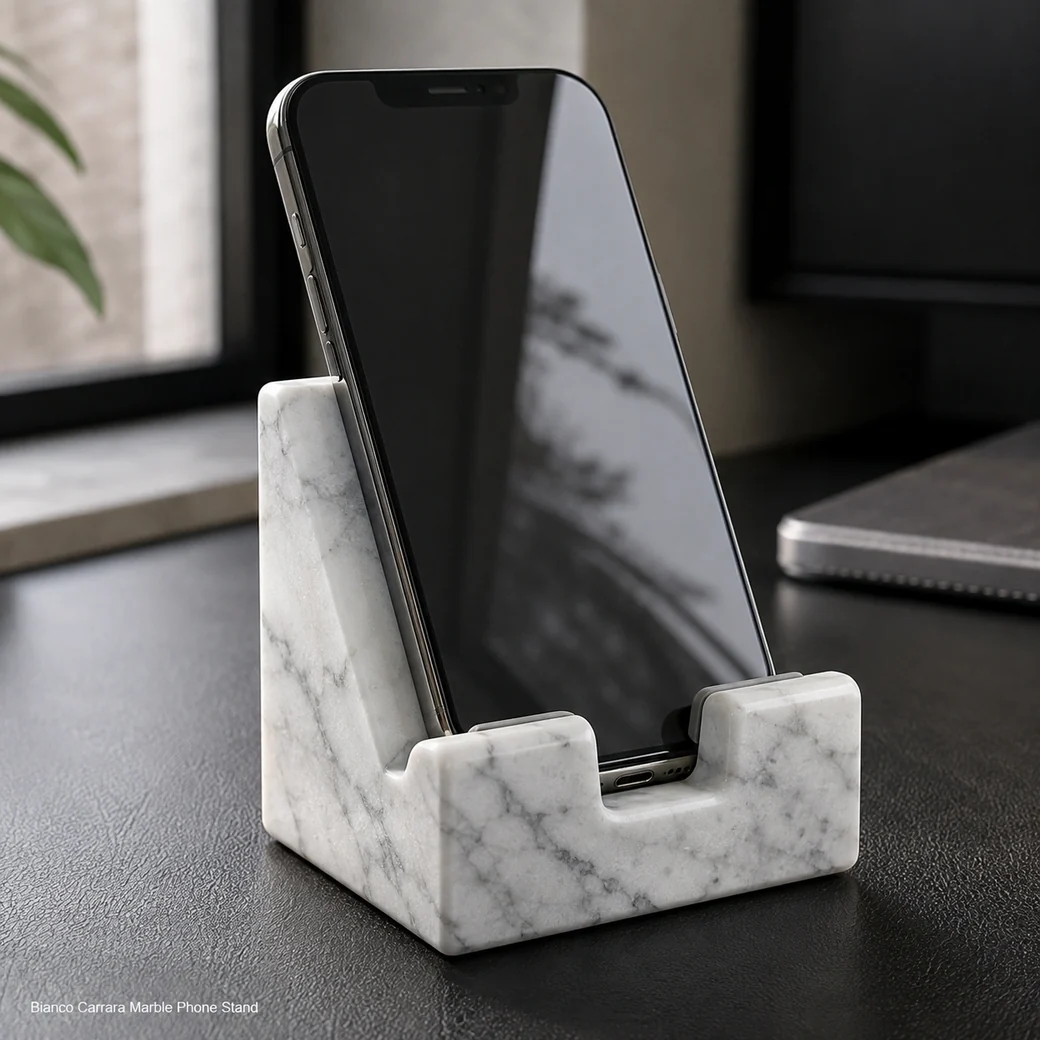
A phone stand or mobile phone stand can support most smartphones when the cradle width and lip suit the device, while a wider tablet cellphone stand may also accept small tablets. A good mobile stand for table use supports portrait and landscape viewing and leaves the charging port accessible. The weighted base helps video-call stability; use a protective pad at contact points and wipe the stand with a soft neutral-cleaner cloth.
Stable Hands-Free Device Support
Marble Phone Stand Small
Secure product inquiry
Buy now
Cash on delivery available. Product details are pre-filled below. Owner delivery adds AED 5,000.
Portrait, Landscape & Sound Channel
Device Fit, Viewing Angles and Surface Protection
A well-cut phone slot should support both portrait and landscape viewing without allowing the device edge to rub directly against stone. Compact carved marble stands often use silicone dots or similar protective contact points, while some designs incorporate a channel that passively directs and amplifies the phone speaker. At 0.55 kg, this Bianco Carrara stand has enough mass for video calls, recipes or streaming without requiring a bulky desktop footprint.
Device Fit
Choosing the Right Natural Stone Phone Holder
Check the actual smartphone width and case thickness against the cradle before choosing a natural-stone holder, because a case can substantially change how securely the device sits. A deeper universal cradle suits several phone models, while a model-specific slot can provide a tighter fit; in either case the front lip should retain the phone without covering important screen or charging access.
Viewing Modes
Carrara Mobile Dock Configurations
Portrait positioning is ideal for calls and messages, while landscape orientation suits streaming and longer video viewing. A recipe setup benefits from a slightly more upright angle for countertop reading, whereas video calls need the camera closer to face level; every format should preserve charging access without forcing the cable sharply beneath the phone.
iPhone Stand Slot and Case Compatibility
Match the cradle slot to the phone’s thickness including its case, keeping the 8.3 × 6.3 × 11.4 cm stand stable while preserving charging access.
Desk Phone Dock Cable Clearance
Keep the charging port exposed and place the cable channel directly beneath or behind it so the connector can enter without sharp bending or lifting the phone from its cradle.
Bianco Carrara Smartphone Contact Pads
Add felt or silicone wherever the phone rests against Bianco Carrara so the device, case and camera edges cannot scrape directly against stone.
Product Data
Cool White Mobile Stand Details
This small Cool White Mobile Stand uses Bianco Carrara Marble with a Cool Bianco White appearance and Honed Finish. Its 8.3 cm × 6.3 cm × 11.4 cm dimensions and 0.55 kg weight create a compact stable format for supporting a compatible smartphone in everyday desktop or countertop use.
| Viewing Angle Degrees | 60° viewing angle |
|---|---|
| Device Stop Height | 12 mm front device-stop height |
| Cable Channel Width | 12 mm-wide × 8 mm-deep charging-cable channel |
| Case Thickness Allowance | Accommodates phones and protective cases up to 14 mm total thickness |
| Base Pad Material | 2 mm-thick microsuction silicone base pad, Shore A 50 |
| Camera Clearance | Rear opening maintains camera clearance for camera modules up to 45 × 45 mm |
| Speaker Opening Clearance | Bottom opening at least 20 × 8 mm to avoid obstructing downward-facing speakers |
| Magnetic Accessory Clearance | Minimum Ø65 mm unobstructed rear zone for magnetic charging accessories |
| One-Hand Docking Space | Minimum 25 mm clear side access around the device for one-handed docking and removal |
| Edge Radius | R4 mm radius on exposed stone edges and device-contact corners |
Made to Order
Custom Cellphone Dock Options
A custom cellphone dock should be sized around the actual device, protective-case thickness and charging-connector position. Slot width, viewing angle, speaker clearance and cable opening can be revised for portrait or landscape use while maintaining enough stone at the device-contact edges.
Key Benefits
Why Choose This Marble Phone Dock
A marble phone dock gives buyers a compact hands-free support for calls, videos or desk viewing without taking much working space. A properly sized cradle and lip keep the device stable in portrait or landscape orientation, while access to the charging port can be preserved. The Carrara base adds enough weight to reduce movement when the screen is tapped or the phone is removed.
- Portrait Landscape Viewing
The Carrara cradle supports both portrait and landscape viewing, allowing comfortable calls, videos or desk use without holding the phone.
- 0.55 kg Stability
The 0.55 kg Carrara body gives a smartphone enough stable support for hands-free calls, video viewing and screen interaction.
- Charging Port Access
An open cradle or cable cut-out keeps the charging port reachable so the phone can remain powered while standing upright.
- Custom Slot Sizing
Cradle width, lip depth and contact padding can be customized around the specific phone and case thickness for a more secure fit.
Purchase Guidance
Before Ordering a Stone Smartphone Stand
Before ordering a Bianco Carrara smartphone stand, measure the phone with its normal case fitted so the cradle width and lip support the actual device without pinching or excessive play. Confirm whether portrait, landscape or both orientations are required and identify the charging-port location so the cable remains accessible while docked; visually distinctive materials such as travertine wood can be considered for other coordinated stone pieces.

Specification Reference
Carrara Phone Holder Technical Specifications
The technical table should confirm the 8.3 × 6.3 × 11.4 cm dimensions and 0.55 kg weight together with cradle or slot width, viewing angle, charging-port clearance and compatibility with your phone both with and without a case so you can avoid an unstable or overly tight fit.
Product details
Specifications, care, delivery and FAQ
Everything is rendered from product JSON fields so the page remains SEO-ready even before JavaScript runs.
Cleaning: Remove and unplug the phone before cleaning, dust the honed Bianco Carrara cradle and charging opening with a dry microfiber cloth, wipe with a barely damp neutral-cleaner cloth and dry fully, clean felt or silicone contact pads separately, avoid sprays acids abrasives and moisture near charging cables
Daily Care: Keep the honed Bianco Carrara cradle and charging opening dust-free, wipe with a barely damp microfiber cloth, clean felt or silicone contacts daily, keep charging cables and electronics dry, avoid acids abrasives and sliding the phone across stone
- Avoid blocking the charging port with an unsuitable lip
- avoid bending the charging cable beneath the phone
- avoid direct device contact without protective padding
- avoid liquid near electronics
- avoid acidic or abrasive cleaners
Maintenance: Keep the cradle charging opening and lip free of dust, wipe honed Bianco Carrara with a barely damp microfiber cloth, clean or replace felt and silicone pads, confirm cable clearance without bending connectors, keep liquids away from electronics, support both orientations only within the stand’s stable geometry
Handling: Remove and unplug the phone before handling the 0.55 kg stand, grip the stone base rather than the cradle lip, lower the device onto padded contacts, route straight or right-angle connectors without bending, keep the stand away from table edges, never drag the phone across Carrara
How wide should the slot of a marble phone stand be for a smartphone with a protective case so it fits securely without being difficult to insert or remove?
Measure the phone at its thickest point with the protective case installed, then specify a slot approximately 1–2 mm wider for easy insertion without excessive movement. Most cased phones need roughly 12–16 mm, but rugged cases may require 18–22 mm; the slot should have smooth edges, a protective liner and enough depth to prevent tipping.
Can the phone be positioned securely in both portrait and landscape orientations while connected to a charging cable and fitted with its normal protective case?
The stand can support both orientations if its ledge is wide enough for landscape use, the slot fits the cased phone and the centre of gravity remains inside the base. A central cable channel should remain accessible in portrait mode, while landscape placement must not obstruct side buttons, speakers or the charging connector.
What recline angle provides the best balance between screen visibility and stability for video calls, media viewing and everyday notifications at a desk?
A recline angle around 60–70 degrees provides a good balance for desk notifications, media and seated video calls. Approximately 65 degrees is a versatile default, provided the phone’s center of gravity stays over the 8.3 × 6.3 cm base and the retaining lip supports a cased device.
Does the stand leave enough clearance beneath the docked phone for a straight or right-angle charging connector without bending the cable or lifting the device from its support?
Charging access requires a cable channel wide enough for the connector body and enough vertical clearance beneath the phone’s port. Allow roughly 15–20 mm for many straight connectors and a broader side relief for right-angle plugs, with rounded edges and natural cable bend radius; the actual phone, case and cable should be test-fitted before fabrication.
Is neutral silicone or soft felt better at the phone’s contact points for preventing scratches while keeping a cased device stable in portrait and landscape orientations?
Neutral non-marking silicone is better for most phones because it cushions the device while providing grip in both orientations. Felt is soft but collects dust and permits more sliding; use thin replaceable silicone strips along the lip and back contact points without blocking speakers, buttons or the charging port.
Reviews
Reviews and new review submission
0.0 average rating from 0 reviews. New reviews are saved as pending until approved.
No approved reviews yet for this product. The review form is ready for buyer submissions.